 RC-Structura beta
Using RC-Structura, page by page.
The project, the materials, the seven pages, the reinforcement editor and the load takedown — in the words you will see on screen.
Before you start
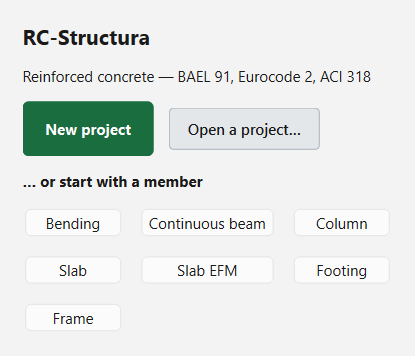
Run RC-Structura.exe and sign in with the email and password you received (see the Beta page). The welcome screen then offers to continue a recent project, open one, start a new one, or start straight away with a member type.
The screen
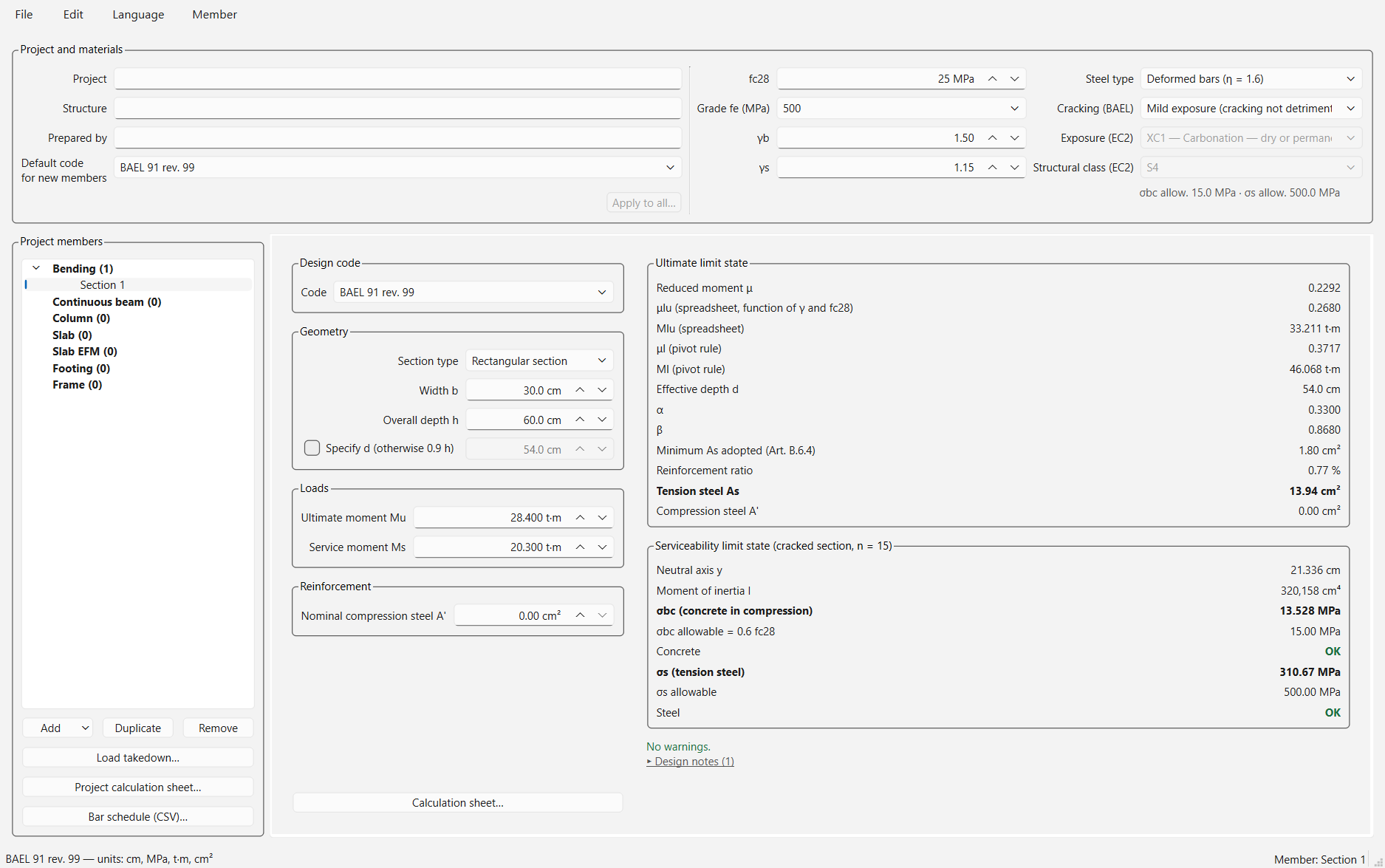
- At the top, the File, Edit, Language and Member menus, then the Project and materials banner, shared by the whole project.
- On the left, the project's members, grouped by type, and the buttons that act on the whole project.
- In the middle, the page of the selected member: input, results, observations, drawings.
- At the bottom, the status bar recalls the displayed member's code and the units.
Units
| Quantity | Unit |
|---|---|
| Spans, story heights, load positions | m |
| Section dimensions, cover, support widths | cm |
| Point loads, axial forces, shears | t (metric tons-force, 1 t = 10 kN) |
| Distributed loads | t/m (beams), t/m² (slabs) |
| Moments | t·m |
| Material strengths | MPa |
| Steel areas | cm² |
In tables, either a comma or a point is accepted as the decimal separator. A field that shows a dash has no value yet: the page computes nothing while a dimension or a load is missing, and says which one.
The project
Create, open, save
File menu: New project (Ctrl+N), Open… (Ctrl+O), Save (Ctrl+S), Save as…. A project is a single .stproj file holding all its members. An asterisk in the window title flags unsaved changes.
Edit menu: Undo (Ctrl+Z) and Redo (Ctrl+Y) cover the whole project — input, adding or removing members, the materials banner.
The Project and materials banner
- Project, Structure, Prepared by: printed at the head of every calculation sheet.
- fc28 (f'c), Grade fe (MPa), γb, γs, Steel type, Cracking (BAEL), Exposure (EC2), Structural class (EC2). These values apply to EVERY member of the project: changing the concrete changes every beam, because it is the same concrete. Fields that no code in use needs are grayed out.
- Default code for new members: the code a newly created member receives. Each page then keeps its own; changing the default does not touch existing members. Apply to all… moves them to the default, after a question that names each one.
Members
Add (under the list, or Member menu → Add) creates a member of the chosen type; Duplicate copies it; Rename… (Member menu) changes its name; Remove deletes it. Click a member in the list to show it.
Language menu: Français or English. The interface switches at once, without losing anything; calculation sheets and drawings are written in the language chosen.
What every page has in common
- The page's code. Each page has its own selector (Design code): BAEL 91 rev. 99, Eurocode 2 or ACI 318M-25. It applies to the displayed member only. A blue banner flags a member that does not follow the project default — not an error, a project may mix codes.
- Calculation. The Continuous beam and Frame pages have a Calculate button; the other pages recalculate as you type. When an input changes on the Beam page, the displayed results are cleared until the next calculation, so you never read the results of another beam.
- Observations, under the results, in three kinds: warnings (first, to fix or confirm), what is not checked by this page (always visible), and design notes (the justification, collapsed behind a link). Always read the first two.
- Calculation sheet… opens the member's sheet in your browser. For a PDF: Ctrl+P, then "Save as PDF".
- Tooltips. Hover over a field: most give the clause that governs it and what to enter.
- Drawings zoom with Ctrl + mouse wheel and pan by dragging; a double-click fits them again.
Bending
One section under one moment: tension steel, and compression steel when needed.
- Code: the design code.
- Geometry: Section type (rectangular or T), Width b — for a T, Web width b₀ and Flange thickness h₀ —, Overall depth h. Tick Specify d when the effective depth is not 0.9 h.
- Loads: Ultimate moment Mu and Service moment Ms, in t·m (under ACI, Mu is the factored moment).
- Reinforcement: Nominal compression steel A', compression steel you place anyway.
On the right, the results: under ACI, strength design (equivalent stress block, net tensile strain εt, φ); under BAEL and Eurocode, the ultimate and serviceability limit states.
Continuous beam
The most complete page: it analyzes the beam, reinforces it and draws it.
1. Spans
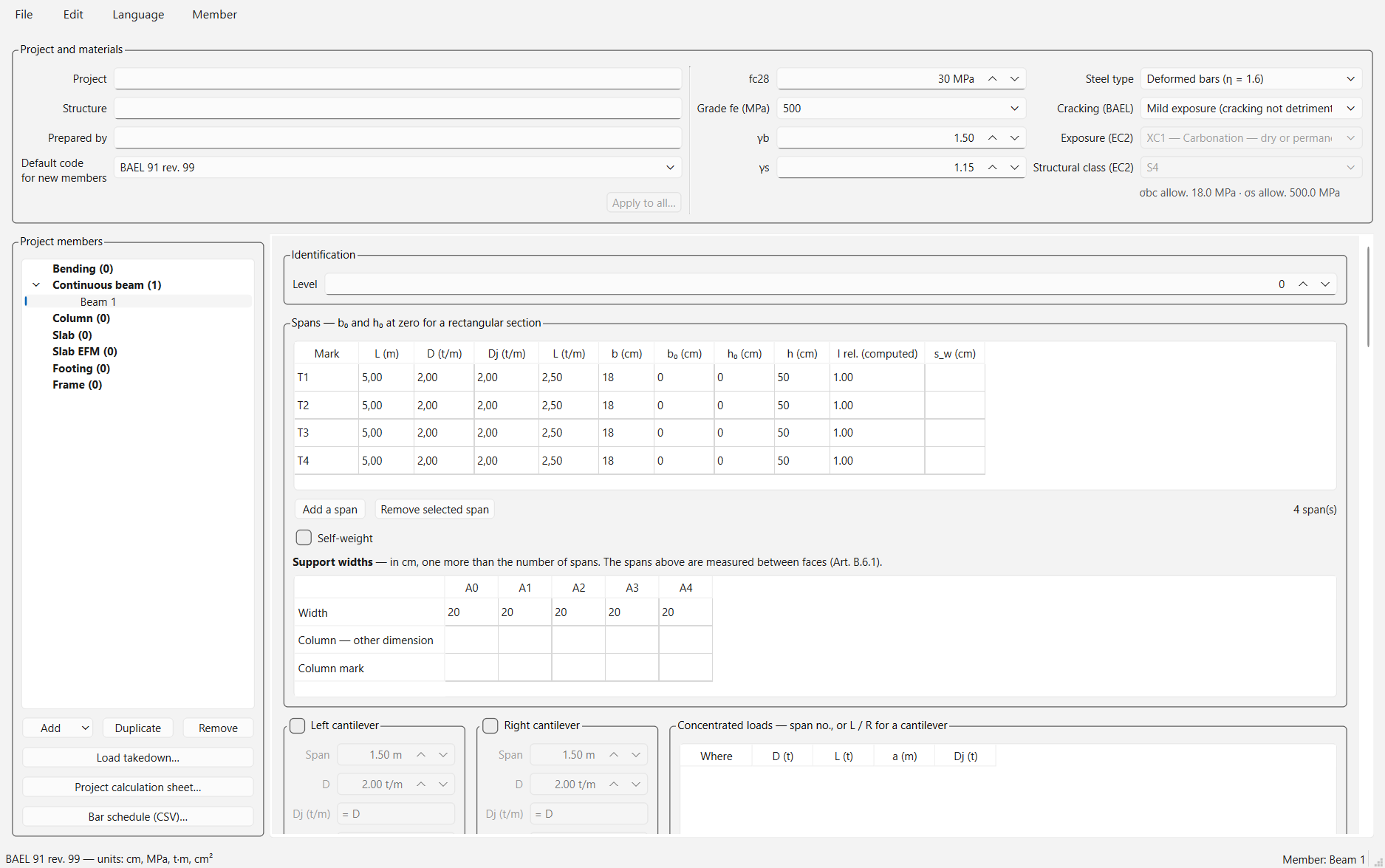
One row per span (Add a span, Remove selected span):
- L (m): the clear span, between support faces. Each code derives its own analysis span (face to face under BAEL, center to center under ACI, l_eff under Eurocode).
- D (t/m), L (t/m): distributed dead and live loads; Dj: the part of D present when partitions are installed (deflection).
- b, h: the section, in cm. For a T-beam, b₀ (web) and h₀ (flange) — at zero for a rectangular section — and, optionally, s_w, the clear distance to the next web, which lets the code limit the flange width.
Self-weight: tick it to have the page add the beam's weight to D.
2. Supports
The Support widths table has one more column than there are spans (A0, A1…):
- Width: the support width along the beam, in cm.
- Column — other dimension: the column's other side, if there is one — used to create the project's columns.
- Column mark: the column's mark (C1, C2…). It ties the beam to the load takedown. The same mark on several beams stacks their reactions under the same column.
3. Cantilevers and other loads
- Left / Right cantilever: tick it, then Span, D, Dj, L.
- Concentrated loads: Where = the span number, or L / R for a cantilever; D (t), L (t); a (m) = the distance from the span's left support; Dj (t).
- Partial distributed loads: between a1 and a2, uniform (D1 = D2) or varying (triangular, trapezoidal). Triangular/trapezoidal load… helps enter them.
4. Calculate
In the Calculation group: the Design code and the Analysis — Caquot (BAEL) or the stiffness method (elastic analysis, the default under ACI and Eurocode). Then, depending on the code: Reduced Caquot, Moment redistribution, the seismic options (PS 92, Eurocode 8 medium ductility, ACI special moment frame §18.6), Untreated construction joint (k = 0) under BAEL, φ creep under Eurocode. Click Calculate.
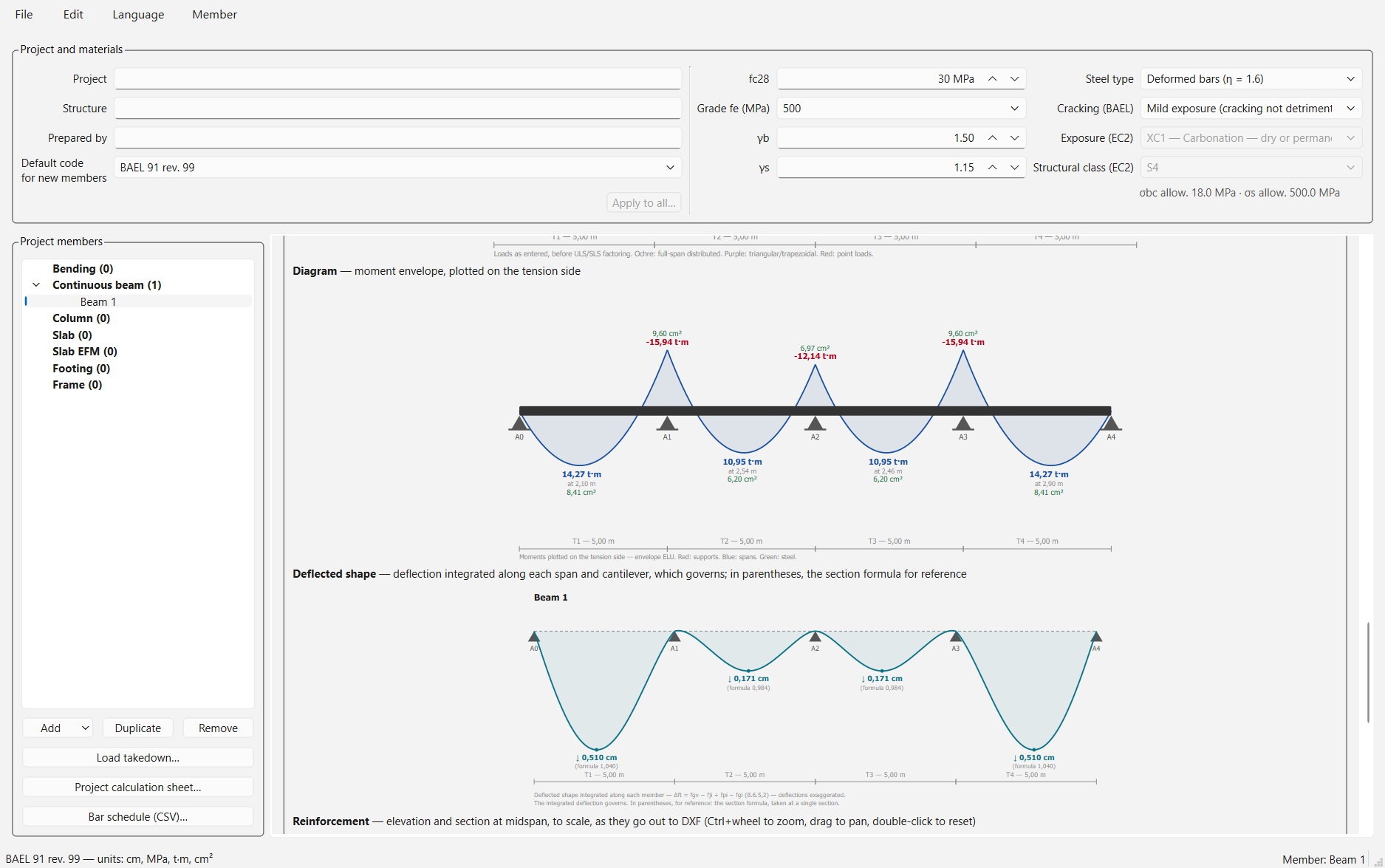
5. Reading the results
- Supports and Spans: moments, steel required and placed, shear, stirrups, deflection, verdict per row.
- Loads: the beam as entered; click a load to jump to its row.
- Diagram: the moment envelope; Deflected shape: the integrated deflection, which governs.
- Reinforcement: the elevation and sections, as they go out to DXF.
6. What comes out
Calculation sheet…, Export the reinforcement (DXF)…, Bar schedule (CSV)…, and Edit reinforcement… (below). Send the columns… and Send to the footings… are described under the load takedown.
The reinforcement editor
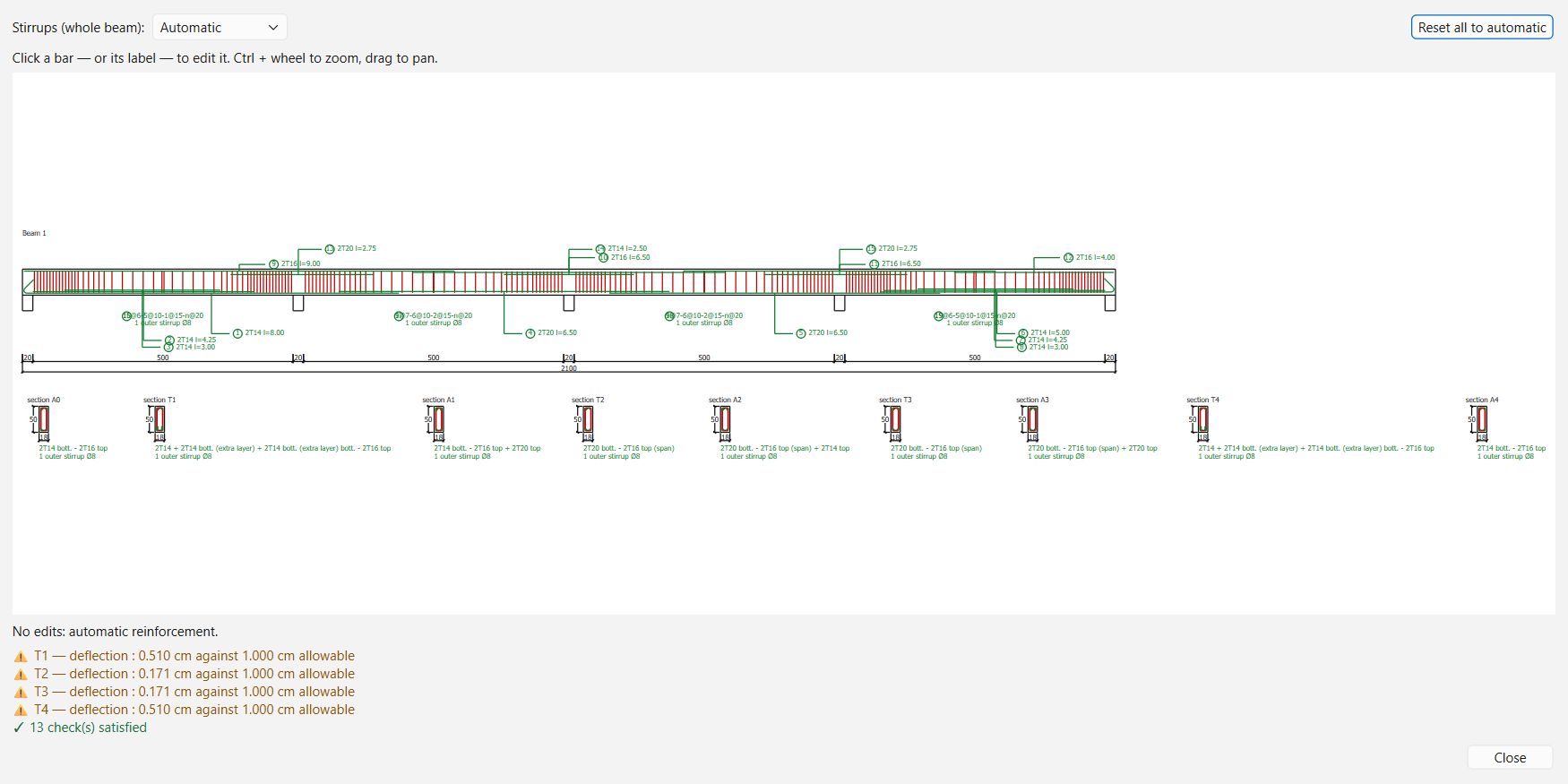
Edit reinforcement…, on the Continuous beam page, opens the drawing full size. The proposed reinforcement is automatic; you can change it:
- Click a bar, or its mark: a panel lets you change the number of bars, the diameter, the length, remove a layer, or return that group to automatic.
- Stirrups (whole beam): the stirrup size, for the whole beam.
- Reset all to automatic clears all your changes.
Your choices are saved with the beam and applied at every calculation: effective depth, cut-offs, bar schedule, DXF and calculation sheet follow them. Every change is checked — steel placed against steel required, bars within the width, lengths, stirrups — and the list of checks shows under the drawing. While a blocking check fails, the DXF export stays closed: the beam is still drawn, so you see what you asked for.
Column
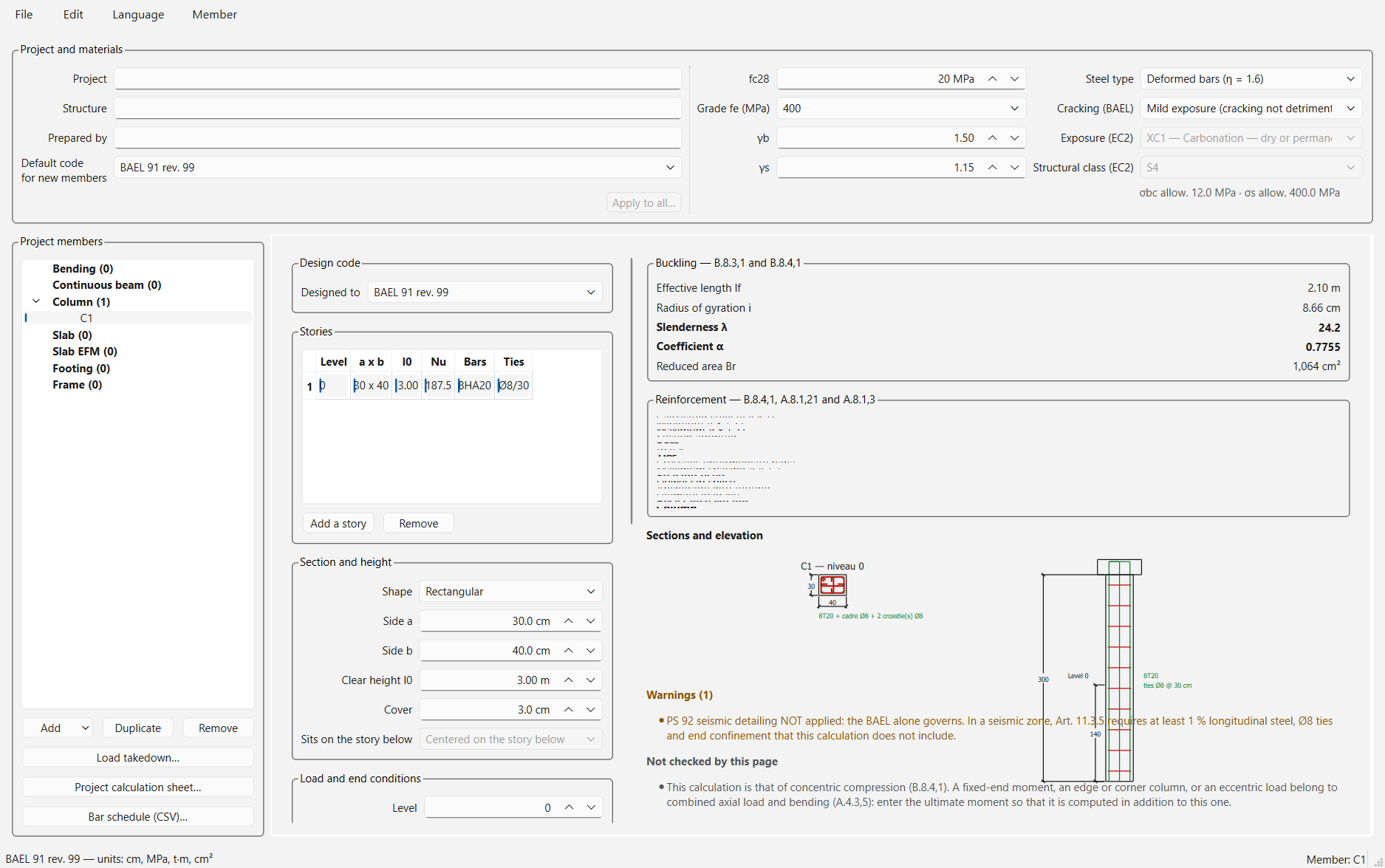
A column over one or more stories, rectangular or circular.
- Stories: Add a story / Remove; pick the story to edit in the list.
- Section and height: Shape (rectangular or circular — a circle has a single diameter), Side a, Side b, Clear height l0, Cover, Sits on the story below.
- Load and end conditions: Ultimate N, Ultimate M and, if any, Ultimate M, other plane; Plane of the moment; End conditions; Age at loading (BAEL); Seismic; Column self-weight. (Under ACI, "ultimate" means factored: Pu, Mu.)
- Second order: under Eurocode, Braced member and the moment ratio rm; under ACI, Braced against sidesway, the ratio M1/M2, and k from the alignment chart. The Special moment frame (ACI, Ch. 18) and Eurocode 8 — medium ductility boxes turn on seismic design.
Take from the load takedown… fills the stories and their loads from the project's load takedown (see below). Export the section (DXF)…, Calculation sheet….
Slab
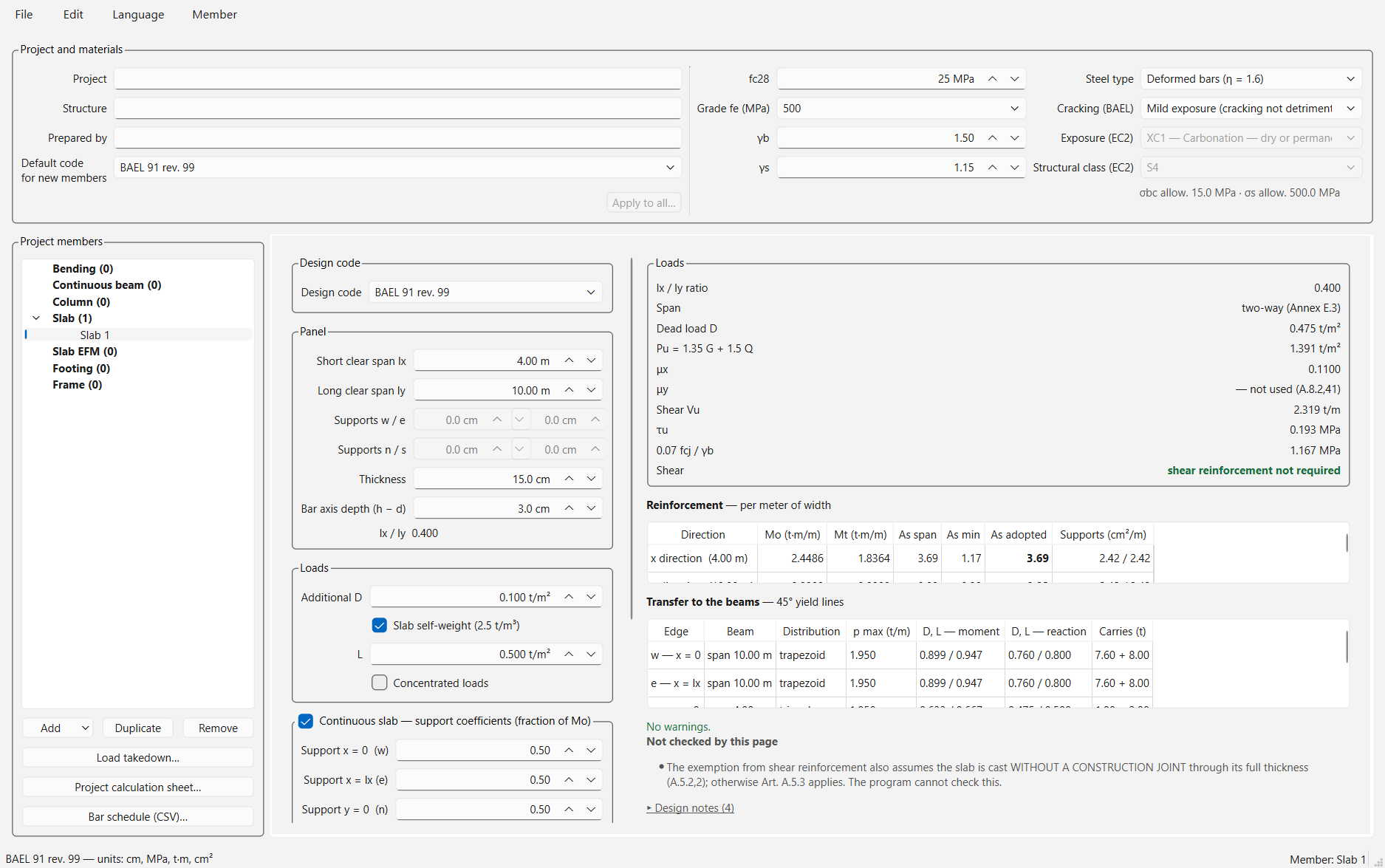
A solid slab panel, one-way or two-way.
- Panel: Short clear span lx, Long clear span ly, Thickness, Bar axis depth (h − d) — the cover plus half a bar —, and, under Eurocode and ACI, the support width on each edge (BAEL does not use it).
- Loads: Additional D (finishes, partitions), Slab self-weight, L; Concentrated loads if needed.
- Continuous slab — support coefficients: for each edge (w, e, n, s), the fraction of Mo taken at the support — 0 for a simply supported edge.
- ACI 318: for a continuous one-way slab, the simplified method of §6.5 (Span position, adjacent spans); for a two-way panel, the continuous edges.
Results per meter of width: moments, steel, spacing, shear. Transfer to a beam… passes the slab's load to a beam of the project (45° yield lines).
Slab EFM
A flat plate on columns, by ACI 318's equivalent frame method (this page is ACI only). One direction at a time: for the other, create a second member.
- Average bar axis depth (h − d) and Column f'c (0 = the slab's).
- Spans: l1 (m) in the direction analyzed, l2 (m) transversely, h (cm), D and L in t/m².
- Columns: one more than spans — c1, c2 (cm) and the clear height.
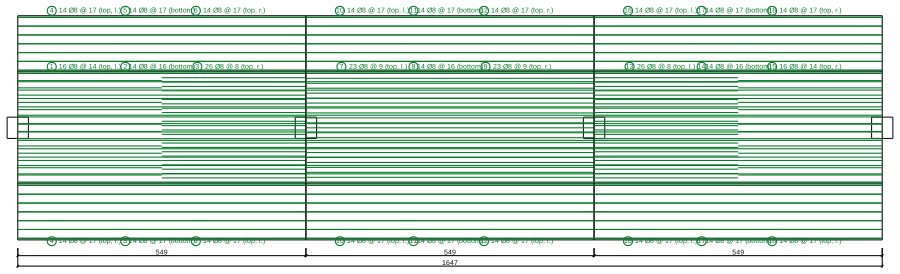
Results: moments at the face, distribution to column and middle strips, steel, two-way shear at every column, reinforcement plan. Export the plan (DXF)…, Bar schedule (CSV)…, Calculation sheet….
Footing
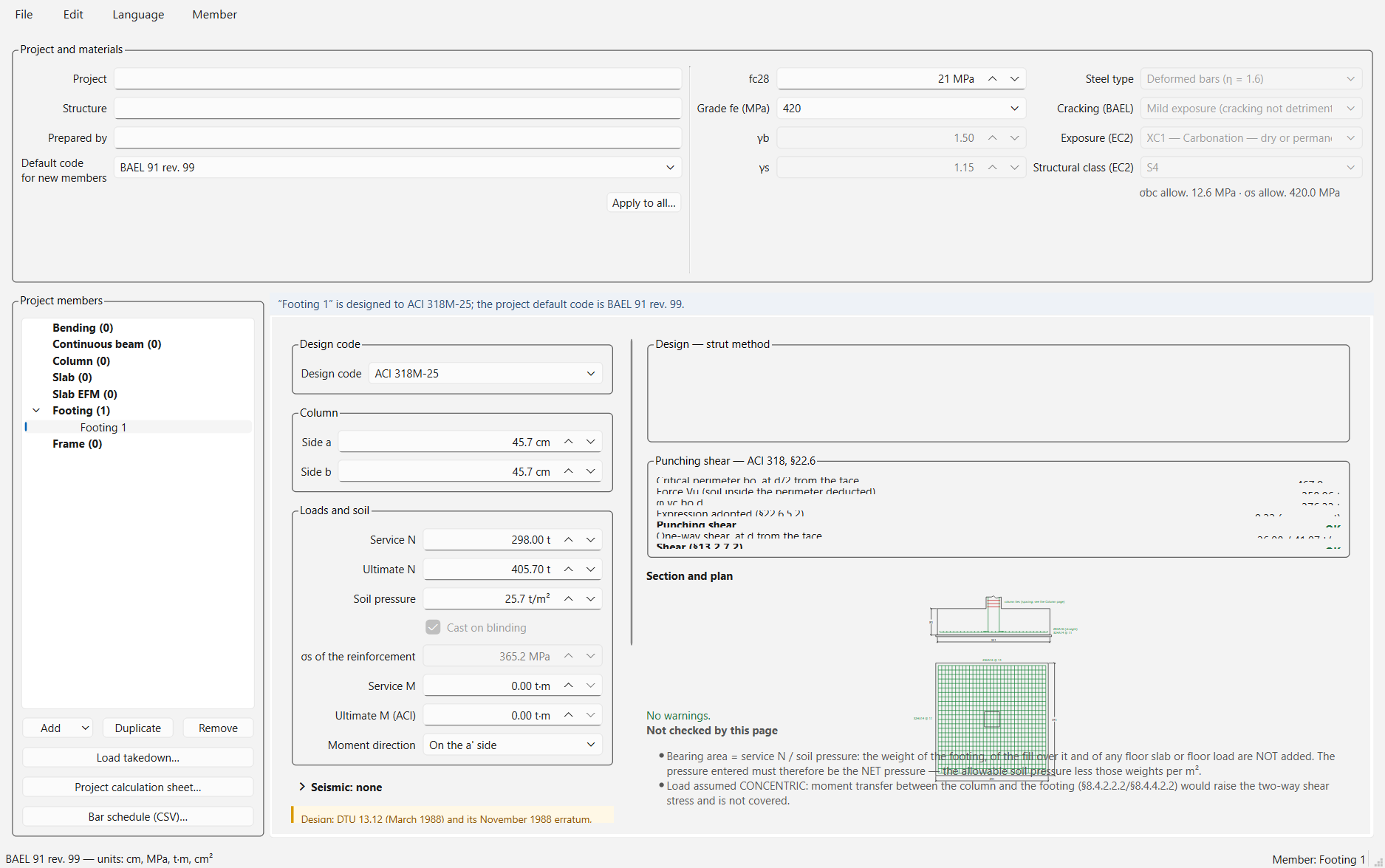
A spread footing under a column.
- Column: Side a, Side b.
- Loads and soil: Service N, Ultimate N (factored under ACI), Soil pressure — the net allowable pressure: the page adds neither the footing's weight nor the soil's. Under Eurocode, Cast on blinding sets the cover.
- Eccentric load (optional): Service M, Ultimate M (ACI), Moment direction.
- Seismic, depending on the code: PS 92 art. 9.5.1, ACI §18.13 (special moment frame foundation, seismic tie beam), EN 1998-5 (sliding and seismic bearing capacity).
Results: plan size, depth, both mats, two-way shear, section and plan. Take from the load takedown… takes a column's load from the project; Export the drawing (DXF)…, Calculation sheet….
Frame
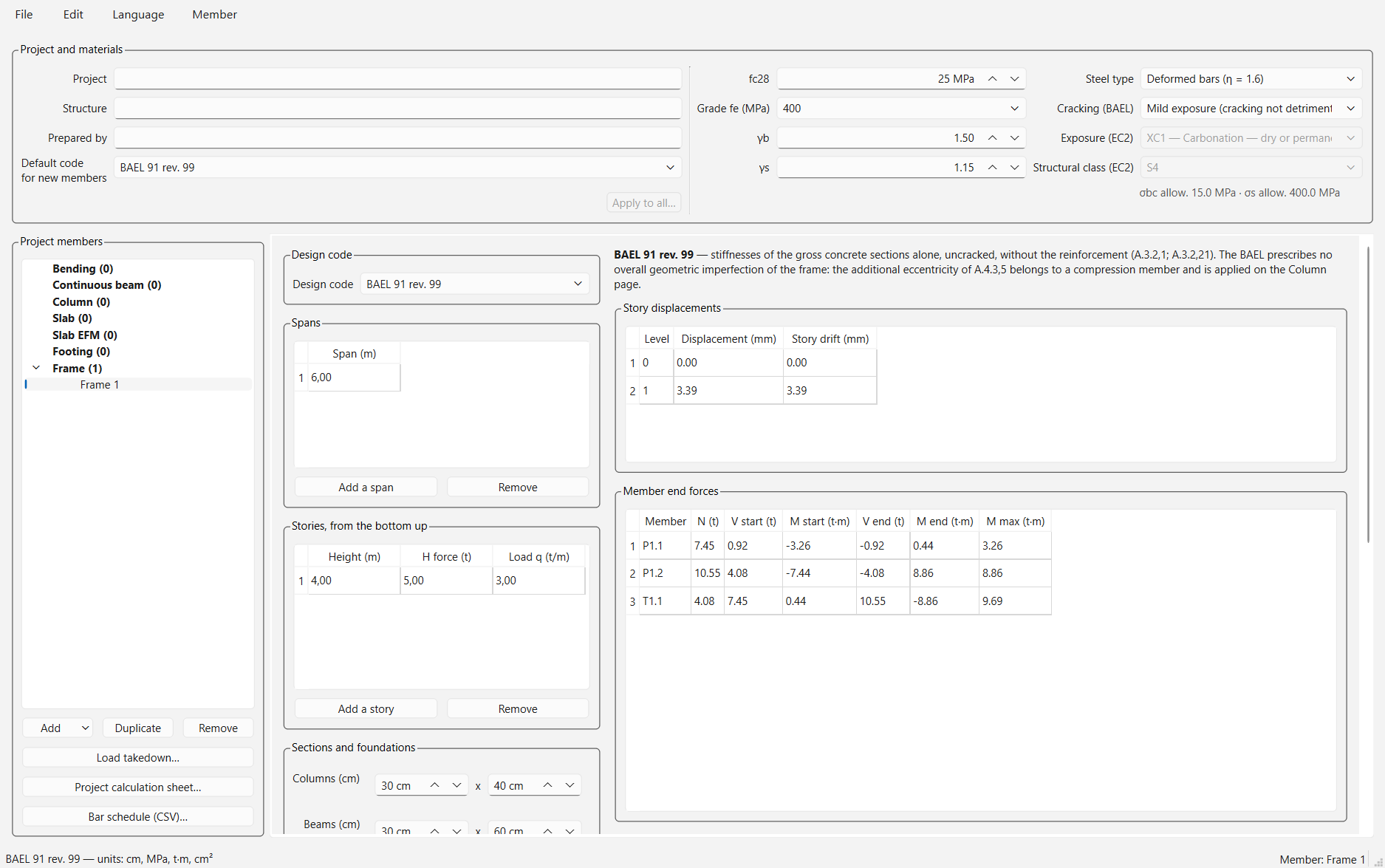
A plane frame, analyzed by the stiffness method.
- Spans: one span per row, in m (Add a span).
- Stories, from the bottom up: Height (m) center to center (from the top of the foundation for the first), H force (t) horizontal at the level, Load q (t/m) on the beams.
- Sections and foundations: Columns and Beams (cm), Column base fixed or pinned, Modulus.
Click Calculate. Results: story displacements, member end forces, support reactions, bending moments. The chosen code sets the analysis assumptions (reduced moments of inertia under ACI, imperfections under Eurocode, gross sections under BAEL). The page solves one load case as entered, without combinations or member self-weight.
The load takedown
It ties the members together: the beams' reactions go down, story by story, into the columns and then the footings.
- On each beam, fill in the Level (Identification group) and, in the supports table, the Column mark row: C1, C2… The same mark on several beams means the same column.
- Calculate the beams. Load takedown… (on the left) shows the total under each column, level by level.
- Send the columns… (Beam page) creates or updates one column per mark, with its section — read from the Width and Column — other dimension rows — and its load, story by story. Send to the footings… does the same for footings, with the load at the lowest level.
- For a single member: Take from the load takedown… on the Column or Footing page.
Each member keeps its own code. A column that would receive loads computed under two codes is marked not valid; a beam that does not calculate is named, and its columns marked incomplete.
Project documents
- Project calculation sheet…: every member's sheet, in one document.
- Bar schedule (CSV)…: the steel of every beam, to open in a spreadsheet.
- File → Export all reinforcement (DXF)…: every drawing of the project.
A typical workflow
New project; fill in the banner: name, concrete, steel, default code. Save right away.
Slabs first: their reactions give the beams' loads (Transfer to a beam…).
Beams, level by level, with the column mark under each support. Calculate, read the warnings and what is not checked, adjust in the reinforcement editor if needed.
Send the columns… then Send to the footings…; complete and check each column and footing.
The documents: Project calculation sheet…, Bar schedule (CSV)…, Export all reinforcement (DXF)….
Reporting a problem
A result that looks wrong, an unclear screen, a badly drawn plan: write to rcs.structura@gmail.com. Attach the .stproj file if you can and say what you expected — and, for a calculation gap, the source (manual, example, your own calculation). That is exactly what the beta is looking for.